

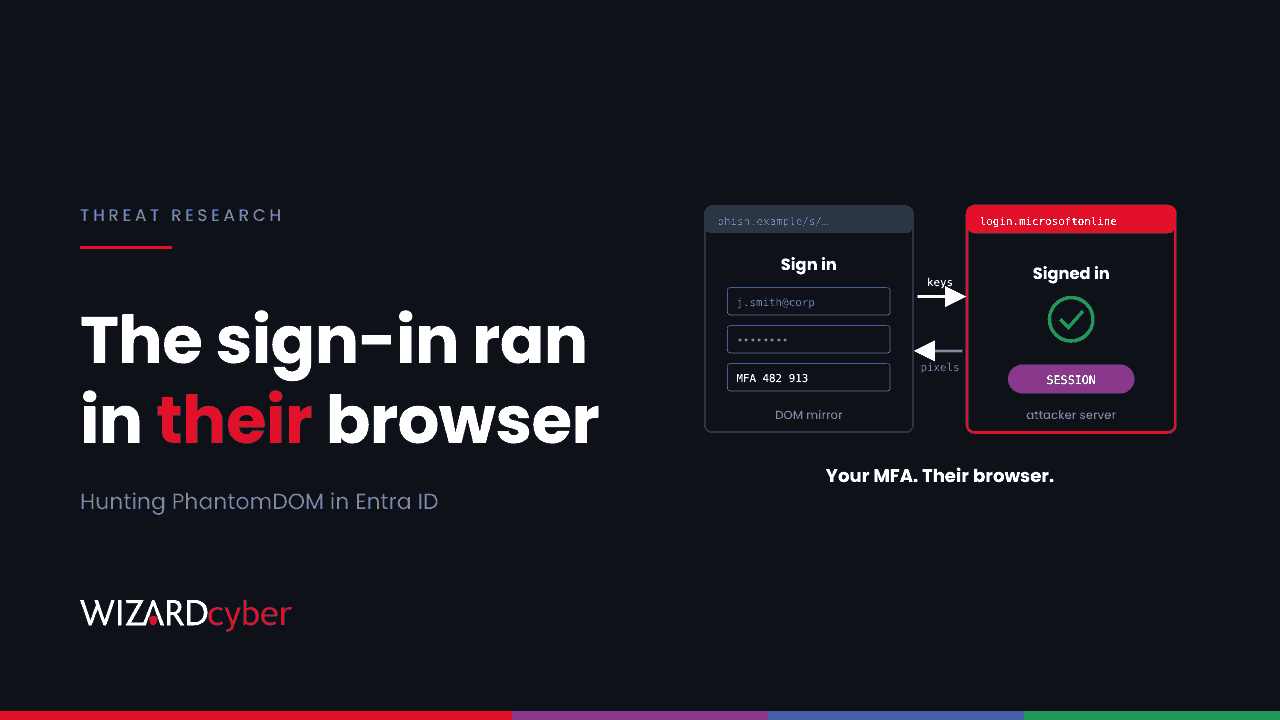
Most phishing kits that beat MFA either relay your sign-in through a proxy or steal the session cookie afterwards. PhantomDOM does neither. It opens a real browser on the attacker's server, signs in to Microsoft there, and shows the victim a live copy of that page. Every keystroke and MFA code the victim types goes into the attacker's browser. When the victim is done, the authenticated Microsoft 365 session is already where the attacker wants it, and nothing needs to be copied. This post covers how the kit works and how to find it in Entra ID and Microsoft 365 logs.
What happened
On 5 November ZeroBEC published an analysis of a phishing kit it calls PhantomDOM, based on a controlled run of the campaign against a test account. The Hacker News picked it up in its 9 November weekly recap. ZeroBEC says the campaign was detected and stopped. The kit is what matters, because the technique will be copied.
How the kit works
- The lure. An email with an empty body and a single PDF, styled as a SharePoint "shared with you" notice with a "View & Enroll" button and a three-day expiry. In the sample, the sender was a legitimate domain that had probably been compromised.
- Filtering. The link passes through a redirector and a fingerprinting page that checks the browser's WebGL, screen size and time zone. Sandboxes and scanners are turned away. Real browsers continue.
- Gatekeeping. The entry host issues a short-lived token and shows a Microsoft-styled "Verify it's you" page with a CAPTCHA. This page then starts a session on the kit's backend.
- The remote browser. The kit opens Microsoft's real sign-in page in an automated Chrome instance on its own server. It streams the page structure (the DOM) to the victim over a WebSocket, so what the victim sees isn't a clone or a video. Input goes back the other way: keystrokes, edits, MFA codes and pasted text. An operator can watch the session or take it over.
- The exit. After sign-in, the victim is sent to a genuine DocuSign page, which looks like a dead link.
Because the Microsoft session exists only in the attacker's browser, controls that look for a stolen cookie being replayed somewhere else have nothing to catch. In ZeroBEC's test the kit's own operator moved between two IP addresses while keeping the same Entra session, and that turns out to be the most useful thing to hunt.
What the attacker did next
In ZeroBEC's 4 November test, after the sign-in:
- Sign-ins came from
31.57.184[.]150and then80.66.197[.]95, sharing one Entra session ID. - The account requested passkey creation options within seconds. No passkey was registered, but the attempt shows the attacker wanted a credential of their own.
- Mail was read through Outlook on the web, recorded as
MailItemsAccessedwith access typeBind. - OneDrive was provisioned for the account during the session.
Hunting in Entra ID and Microsoft 365
These queries are starting points to tune. Column names, especially session identifiers, differ between the Entra sign-in tables and the Defender advanced hunting tables, so check a few rows in your tenant first.
1. One session, more than one IP or country
// Interactive sign-ins that share a session ID across different IPs and ASNs
SigninLogs
| where TimeGenerated > ago(14d)
| where ResultType == "0" and isnotempty(SessionId)
| summarize IPs = make_set(IPAddress, 10), Countries = make_set(Location, 5),
            ASNs = make_set(AutonomousSystemNumber, 5), Apps = make_set(AppDisplayName, 10),
            First = min(TimeGenerated), Last = max(TimeGenerated)
    by UserPrincipalName, SessionId
| where array_length(ASNs) > 1
| extend MinutesSpan = datetime_diff("minute", Last, First)
| order by MinutesSpan asc
One session moving between providers within minutes is unusual. Users who move from home broadband to a mobile network will show up too, so compare the providers: hosting and VPS ASNs are what this kit used.
2. Sign-ins from the published infrastructure
let PhantomIPs = dynamic(["31.57.184.150","80.66.197.95","31.57.184.111","31.57.184.23"]);
union SigninLogs, AADNonInteractiveUserSignInLogs
| where TimeGenerated > ago(30d)
| where IPAddress in (PhantomIPs)
| project TimeGenerated, UserPrincipalName, IPAddress, AppDisplayName, ResultType, UserAgent
ZeroBEC points out that two of these addresses were seen on earlier sign-ins and may not be part of the kit itself. Treat a hit as a lead, not a verdict.
3. Authentication method changes soon after a risky sign-in
AuditLogs
| where TimeGenerated > ago(14d)
| where Category == "UserManagement" or LoggedByService == "Authentication Methods"
| where OperationName has_any ("security info", "passkey", "FIDO", "authentication method")
| extend Upn = tostring(TargetResources[0].userPrincipalName),
         IP = tostring(InitiatedBy.user.ipAddress)
| project TimeGenerated, OperationName, Result, Upn, IP
| join kind=inner (
    SigninLogs | where TimeGenerated > ago(14d) and ResultType == "0"
    | project SigninTime = TimeGenerated, Upn = UserPrincipalName, SigninIP = IPAddress, AutonomousSystemNumber
  ) on Upn
| where TimeGenerated between (SigninTime .. SigninTime + 30m)
| project TimeGenerated, Upn, OperationName, Result, IP, SigninIP, AutonomousSystemNumber
An attacker who gets a passkey or authenticator registered no longer needs the phishing kit. Alert on any registration within 30 minutes of a sign-in from a hosting provider.
4. Mail read through a browser session the user didn't start
OfficeActivity
| where TimeGenerated > ago(14d)
| where Operation == "MailItemsAccessed"
| extend P = parse_json(OperationProperties)
| mv-expand P
| where tostring(P.Name) == "MailAccessType" and tostring(P.Value) == "Bind"
| summarize Items = count() by UserId, ClientIP, ClientInfoString, bin(TimeGenerated, 1h)
| order by TimeGenerated desc
Compare ClientIP with the IPs from query 1. MailItemsAccessed needs audit logging that includes it. Check that your licence and audit configuration record it before relying on a clean result.
5. The lure
EmailAttachmentInfo
| where Timestamp > ago(14d)
| where FileType =~ "pdf" and FileName matches regex @"(?i)^Employee_Enrollment_[0-9a-f]{32}\.pdf$"
| join kind=inner EmailEvents on NetworkMessageId
| project Timestamp, SenderFromAddress, RecipientEmailAddress, Subject, FileName, DeliveryAction
The file name will change in later runs. A broader version, looking for PDF-only messages from first-time external senders with SharePoint wording in the subject, will hold up better.
Mitigation
- Phishing-resistant MFA. A passkey or FIDO2 key stays on the user's device and only responds to Microsoft's real domain. The kit can relay anything the user types, but it can't relay a passkey challenge through a page on its own domain, so the sign-in fails. Make these methods required, not just available. Users who can fall back to an app code or SMS are still exposed.
- Require a compliant or registered device. The attacker's remote browser is not one of your managed devices. A Conditional Access policy that requires a compliant device for Microsoft 365 blocks the session even when the password and MFA code are correct.
- Lock down security info registration. Require a compliant device or a trusted location for registering authentication methods, so a phished session can't add a passkey.
- Respond to the session, not just the password. If you find a hit, keep the evidence, then revoke sessions and refresh tokens, reset the password, and review authentication methods, inbox rules, forwarding, OAuth consents and recent file access.
For how this compares with other techniques, see our posts on token spray-and-replay, device code phishing kits and phishing-as-a-service, and our new explainer on session hijacking.
How a managed SOC helps
A browser-in-the-middle sign-in looks like a normal user completing MFA. What gives it away is context across sources: a session that changes provider mid-flight, a passkey request seconds later, mail read from an address the user never uses. Wizard Cyber's SOCs are staffed 24/7 and have run Microsoft Sentinel since 2019. Every investigation produces a full report, and our identity threat detection and response service focuses on exactly these Entra signals.
Want to know whether your Conditional Access would stop this kit? Talk to our team.